BlinkGTK 1.2.6-build1 Release Notes
Release date: 2026-11-04 / Chromium: 157.0.8103.38 / Language: 日本語 | English
The rendering engine is now Chromium 157. Four points for developers working with Japanese vertical text:
- An underline on ruby-annotated text no longer overlaps the ruby
- Family and other joined emoji now render as a single emoji in vertical text
text-decoration-inset, which shortens both ends of an underline, now works (including in vertical text)- In horizontal text, wavy underlines now keep a continuous wave pattern across element boundaries. Vertical text is unchanged
Startup is also faster (the page finishes loading about 0.3 seconds sooner in our measurement).
- If you are upgrading, check the rows that match your use in Upgrading from an earlier version
- If you are new to BlinkGTK, start with Installation
- If you are moving from WebKitGTK, CEF or Electron, see Migrating from WebKitGTK and Migrating from CEF and Electron
build1: the first build on Chromium 157
This build1 is the Linux package (for example
blinkgtk-1.2.6-build1-linux-x86_64.tar.gz). Chromium is
157.0.8103.38. The changes in this version are described in the sections
below.
What you can now do in vertical text (Chromium 157)
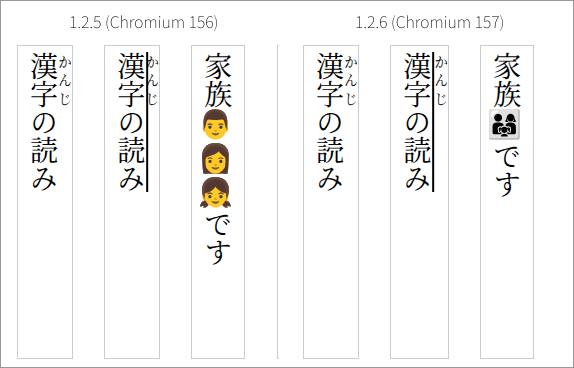
Figure 1: The same page opened in 1.2.5 and 1.2.6 From left: a line with ruby only, a line where the ruby-annotated text is underlined, and a line with a family emoji.
An underline on ruby-annotated text no longer overlaps the ruby
In Japanese vertical text, an underline
(text-decoration: underline) is drawn on the right side of
the characters, which is the same side as the ruby. Up to 1.2.5, the
line and the ruby were drawn in the same place, so the line ran through
the ruby (second column from the left in Figure 1).
In 1.2.6, the ruby of underlined text moves outside the line, so they no longer overlap. Lines with ruby only are laid out as before.
<p style="writing-mode: vertical-rl" lang="ja">
  <span style="text-decoration: underline"><ruby>漢字<rt>かんじ</rt></ruby></span>の読み
</p>- What we checked: on a page like the one above, we measured the ruby position in 1.2.5 and 1.2.6. Only on the underlined line does the ruby move 3px outward in 1.2.6 (at a 28px font size). The line without an underline is in the same place in both versions.
- Because the ruby moves out by the width of the line, layouts with little space outside the ruby may look tighter between lines.
Joined emoji now render as a single emoji in vertical text
Emoji such as 👨👩👧 are several emoji joined by an invisible joining character (ZWJ) and are shown as a single emoji. Up to 1.2.5, vertical text split them into their parts, so the three people were stacked vertically (third column from the left in Figure 1). In 1.2.6 they are shown as one emoji, as in horizontal text.
- What we checked: we measured the height of this emoji in a vertical line. It is 102.6px in 1.2.5 (three characters) and 34.2px in 1.2.6 (one character).
- The font must contain the joined emoji (we used Noto Color Emoji for this check).
Shorten
both ends of an underline (text-decoration-inset)
This property moves the start and end of an underline inward from the edges of the text. In 1.2.3 to 1.2.5 it was not available and was ignored. It works from 1.2.6. In vertical text, the top and bottom ends of the line move inward.
/* move both ends of the line 2px inward */
.underlined { text-decoration: underline; text-decoration-inset: 2px; }- What we checked: we underlined five characters at a font size of
40px in vertical text, set
text-decoration-inset: 10px, and measured the length of the line in pixels. In 1.2.6 it goes from 200px to 180px, 10px shorter at each end. In 1.2.5 the value is ignored and the line stays 200px.
Not changed in vertical text: wavy underlines across elements
In Chromium 157, a wavy underline
(text-decoration: underline wavy) no longer restarts its
wave pattern at the boundary of an inner element such as
<em>; it continues across it. This applies to
horizontal text only.
In vertical text, the wave pattern still restarts at element boundaries in 1.2.6 (the same as 1.2.5). If you put emphasis or other elements inside a wavy underline in vertical text, the wave shifts at the boundary.
- What we checked: we placed the same sentence with and without
<em>around part of it, and compared the pixel positions of the wavy line. In horizontal text the difference disappears in 1.2.6. In vertical text the same difference remains in both 1.2.5 and 1.2.6.
Vertical text still fills the full line (preventing a Chromium 157 problem)
In Chromium 157, when a vertical line ends with a closing bracket or similar, the line can break before using its full length. The line is only partly filled and wraps at about half its length. This happens because Chromium 157 turned off by default the processing that prevented it (a crash had been found on another page).
1.2.6 includes the upstream fix that resolves the crash and turns this processing back on. Upstream, this fix is expected to arrive in Chromium 158.
- What we checked: the first vertical line holds all 35 characters with none missing. When we changed the line length from 544 to 564px in 1px steps, and under 13 conditions that vary punctuation, ruby, fonts and more, each line holds the same number of characters as in 1.2.5. Opening the page on which the crash was found upstream does not stop the page from displaying.
Faster startup
Startup is faster, and the file picker APIs keep working. We restored the startup optimization removed in 1.2.5-build5 (an option that reduces symbol lookups when loading shared libraries), except for the part that caused applications to exit abnormally in build2 to build4. In 1.2.6 we confirmed that calling the file picker APIs from a page does not make the application exit.
Startup time (one machine, Intel Core i5-10310U with Fedora 45; a test page; median of 5 runs per rendering path; measured 2026-11-04):
| Point | Rendering path | 1.2.5-build5 | 1.2.6 | Difference |
|---|---|---|---|---|
Initialization (blink_gtk_init()) completes |
software | 493 ms | 334 ms | −159 ms |
| First frame delivered | software | 1,259 ms | 917 ms | −342 ms |
| Page finished loading | software | 1,237 ms | 895 ms | −342 ms |
| Page finished loading | EGL | 1,387 ms | 1,054 ms | −333 ms |
The Chromium version also changed, so we did not measure how much of the improvement comes from the startup optimization alone. We measured on one machine with one page.
Default change for partial redraws
When only part of a page changes (for example, an animated page), BlinkGTK redrew the whole view every time new content became active. This is now off by default. It had been added to prevent blank pages, but in our checks of the current version no blank pages appeared without it. A separate mechanism (redrawing the whole view when a redraw request is missed) remains.
- When we turned this off in 1.2.5 and measured, the CPU time of the thread that composites the screen went down by about 2 seconds while a partially changing page was shown for 16 seconds (the same on two machines). We did not measure this in 1.2.6.
- In 1.2.6, after this change, we checked for blank pages, rendering and animation, and found no problems.
- To restore the previous behavior, start the application with the
environment variable
BLINKGTK_120_ACT_REDRAW=1. If you see a blank page in 1.2.6, please check whether this setting makes it go away and let us know.
New in Chromium 157 (highlights)
text-overflowaccepts a string. Overflowing text is marked with the string you specify instead of "…" (for example,text-overflow: "… more"). In 1.2.5 the value was ignored- With variable fonts,
font-style: italicandobliqueuse the font's italic axes - You can draw page elements (HTML) into a canvas
(
drawElement) - Canvas color spaces accept the linear spaces
srgb-linearanddisplay-p3-linear - WebTransport can send headers when connecting and read the headers returned by the server
Chromium 157 removed 27 settings (flags that switch features on and
off). The ones that were on by default in 1.2.5 are features that became
permanently on, with their flags cleaned up. For example, we confirmed
that dividing units in calc() and
overscroll-behavior: chain work in both 1.2.5 and
1.2.6.
Upgrading from an earlier version
Check the rows that match how you use BlinkGTK. Each row links to the details.
This table is for the Linux version. If you use BlinkGTK for Windows, see Upgrading from an earlier version in the Windows guide.
| How you use it | What changes | What you need to do |
|---|---|---|
| Underlining ruby-annotated text in vertical text | The ruby moves outside the line (no overlap) | If your layout has little space outside the ruby, check how the space between lines looks. Otherwise nothing (details) |
| Using emoji in vertical text | Joined emoji take the height of one character | Nothing (details) |
Pages that specify text-decoration-inset |
Both ends of the line are shortened as specified (ignored up to 1.2.5) | Check that the result looks as intended with your values (details) |
| Using wavy underlines in vertical text | No change (the wave restarts at element boundaries) | Nothing (details) |
| Showing animated pages or pages where only part changes | The whole view is no longer redrawn each time new content becomes active | Nothing. If you see a blank page, try
BLINKGTK_120_ACT_REDRAW=1 (details) |
| Applications that care about startup speed | Startup is faster (the page finishes loading about 0.3 seconds sooner in our measurement) | Nothing (details) |