BlinkGTK for Windows — Getting started
BlinkGTK for Windows lets you use Chromium's rendering engine (Blink)
as a GTK4 widget, from C.
Unpack the ZIP and run bin\blinkgtk_browser.exe and it
works at once (no administrator rights needed).
The API is nearly the same as the Linux version, so you can use the same
code on both operating systems (the differences are collected in
"Differences from the Linux version" below).
This page describes v1.2.6-build4 (Chromium 157.0.8103.38). On Windows 11 Pro (build 26300), we built it and checked the API, rendering and display paths on 2026-11-06. The final package check also verified unpacking and running the ZIP.
Contents: Who it is for / Run it / Check that it works / Requirements / Embedding it in your app / Upgrading from an earlier version / Differences from the Linux version / The experimental GPU path / If something goes wrong
Who it is for
You want to embed the same rendering engine as Chromium in a GTK4 app. BlinkGTK works as a
GtkWidgetand is driven by a C API.You are considering moving from WebView2, CEF or Electron. WebView2 is a Windows-only component (Win32, WinUI, WPF and similar), so the code is not shared with Linux. CEF has C and C++ APIs and also runs on Linux, and Electron is a framework for JavaScript apps. What is different about BlinkGTK is that you can use it from C as a GTK4 widget. It is an option when you write a GTK4 app in C and want to use the same code on Linux and Windows. It is not a drop-in replacement for an existing app.
You are considering moving from WebKitGTK. BlinkGTK has APIs with names similar to WebKitGTK's. We have not checked compatibility down to the fine details of behavior. The names correspond as follows.
Purpose WebKitGTK BlinkGTK Create a view webkit_web_view_new()blink_web_view_new()Load a URL webkit_web_view_load_uri()blink_web_view_load_uri()Load an HTML string webkit_web_view_load_html()blink_web_view_load_html()Loading notification load-changedsignala load-changedsignal with the same name. The order of the values differs (see the note below)Note: do not reuse the numeric values of
load-changed. In BlinkGTK,BLINK_LOAD_STARTED=0,BLINK_LOAD_COMMITTED=1,BLINK_LOAD_FINISHED=2 andBLINK_LOAD_REDIRECTED=3 (BlinkLoadEventin the headerblink_gtk.h). In WebKitGTK, REDIRECTED is 1 and COMMITTED and FINISHED are each one higher, so reusing the numbers gives wrong results. Always compare with theBLINK_LOAD_*names.BLINK_LOAD_REDIRECTEDis reserved and is not emitted at present.You want to try Japanese vertical text and typesetting. There is an experimental adjustment for vertical text (see Differences from the Linux version). In this version on Windows, hanging punctuation (typesetting that lets punctuation hang past the end of a line) and one-line warichu (inline cutting notes: small notes set in two lines inside a line) work. Warichu that spans lines does not exist yet, even in the Linux version.
What you need depends on what you want to do.
| You want to | You need | Read |
|---|---|---|
| Just try it | Unpack the portable ZIP. No build environment needed | Run it |
| Embed it in your app | The devel ZIP and Visual Studio Build Tools (a C++ compiler). If you have none, start from installing it | the embedding section below,
and section 0 of the bundled
docs\building-with-blinkgtk-en.md |
| Build Chromium itself | Usually not needed. Use the released ZIPs (building it takes a long time and a lot of disk) | — |
Run it
1. Download and unpack
Get the ZIP files from the v1.2.6-build4-windows
release of blinkgtk-dist.
| File | Use |
|---|---|
blinkgtk-1.2.6-build4-windows-x64.zip |
To run it (portable). Start with this one |
blinkgtk-devel-1.2.6-build4-windows-x64.zip |
To embed it (headers and libraries; see Embedding it in your app) |
SHA256SUMS |
To check the ZIPs. Compare it with the output of
certutil -hashfile <ZIP> SHA256 |
Unpack the portable ZIP anywhere. It includes the GTK4 and VC++ runtime DLLs, so there is nothing else to install. There is no installer (MSI) yet.
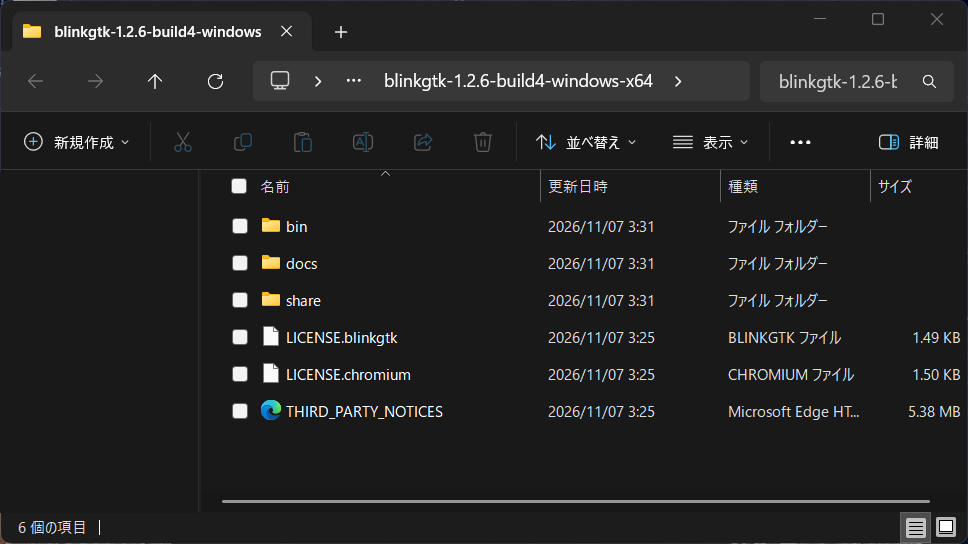
Unpacking gives three folders: bin (the executables
and DLLs), docs (documentation) and share
(GTK4 data), plus the license files (LICENSE.chromium,
LICENSE.blinkgtk and
THIRD_PARTY_NOTICES.html).
2. A warning may appear the first time
This package is not code-signed. If you download it with a browser and run it, Microsoft Defender SmartScreen may show a warning. Follow the prompt to continue (in general, choose "More info" in the warning and then "Run anyway"; we have not captured the actual screen for this release).
The first start right after unpacking can be slow. Microsoft Defender scans the newly written files (there are about 590 DLLs). From the second start on, it is fast. In our check (Intel Core i5-1140G7, default Defender settings, 2026-10-23), the first start right after unpacking took about 11 seconds until the window appeared, and the later starts took about 0.9 seconds. The time varies with the machine and the Defender settings. It will start if you wait, so please wait.
If you use a Windows 11 Dev Drive (a volume for developers) for your work, unpacking onto the Dev Drive makes even the first start fast. On a Dev Drive, Defender runs in "performance mode" and scans files after they are opened (Defender protection stays on). In our check (same machine), the window appeared in about 3 seconds. See Microsoft's description for how to set up a Dev Drive.
3. Run
In File Explorer, open the bin folder of the unpacked
folder and double-click
blinkgtk_browser.exe. Without an argument it opens
https://google.com/ (an internet connection is needed).
To open a page of your choice, use a Command Prompt (search for "cmd"
in the Start menu), move to the bin folder of the unpacked
folder, and run:
cd /d "C:\BlinkGTK\blinkgtk-1.2.6-build4-windows-x64\bin"
blinkgtk_browser.exe https://example.com/
The C:\BlinkGTK\... on the first line is an example.
Replace it with the actual path where you unpacked it
(you can copy the path from the File Explorer address bar). If you paste
< and > as they are, the Command Prompt
treats them as symbols and fails.
With a URL argument it opens that page.
blinkgtk_browser is a minimal sample that shows only what
you need to embed BlinkGTK.
Check that it works
If a web page appears in the window, it works.
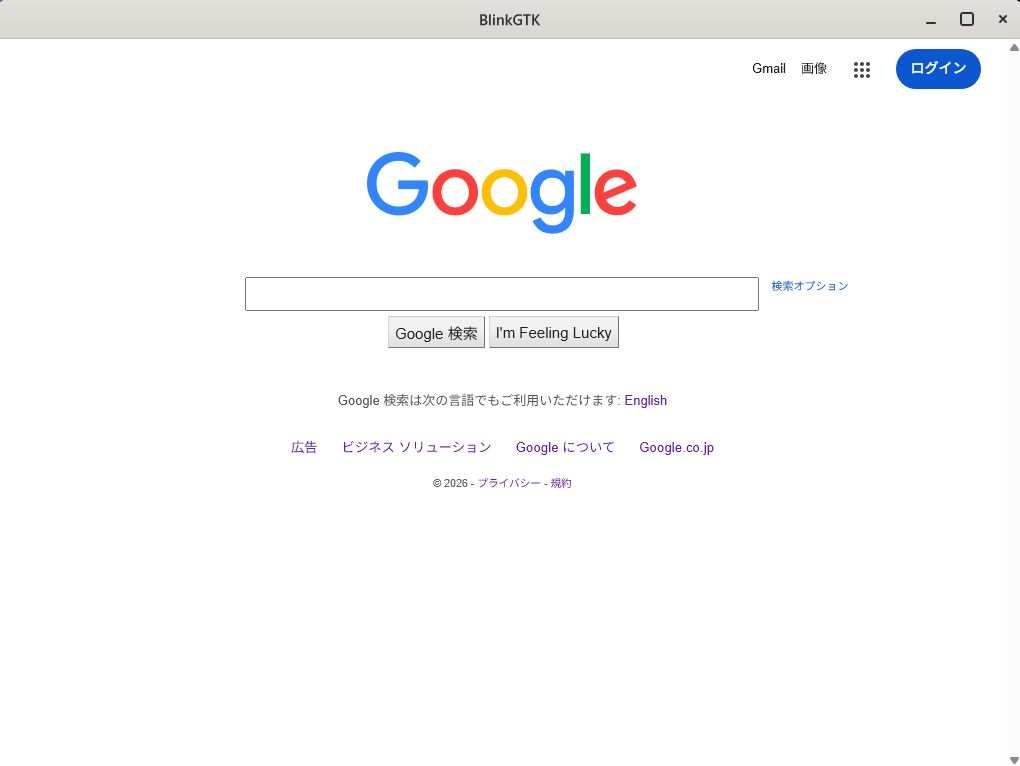
The executable tells you the version you have. Trust this rather than the numbers on the site or in the documents.
> blinkgtk_browser.exe --version
BlinkGTK 1.2.6-build4 (Chromium 157.0.8103.38)- If nothing appears, the window stays white, or it exits at once, see If something goes wrong.
Requirements
| OS | Windows 10 (64-bit) or later. We verified on Windows 11 Pro (builds 26200 and 26300); we have not verified on Windows 10 |
| CPU | x64 (32-bit is not supported) |
| Disk space | About 1.4 GiB (ZIP 379 MiB + about 1,056 MiB unpacked; you need both while unpacking) |
| GTK4 | Bundled. Do not install it separately (mixing it with a GTK4 installed another way may fail to link with the bundled one) |
| VC++ runtime | DLLs bundled (you do not need the redistributable installer) |
The GitHub Releases page shows the same ZIP as "379 MB". Tools that count in units of 1,000,000 bytes show 397 MB.
Embedding it in your app
The devel ZIP
(blinkgtk-devel-1.2.6-build4-windows-x64.zip) contains the
public API headers, the import libraries and the GTK4 development
files.
What you need to build: Visual Studio Build Tools (we checked 2026) with the "Desktop development with C++" workload, and the Windows SDK. If you do not have a build environment yet, section 0 of the bundled
docs\building-with-blinkgtk-en.mdexplains how to install it, with screenshots. You do not need an environment to build Chromium.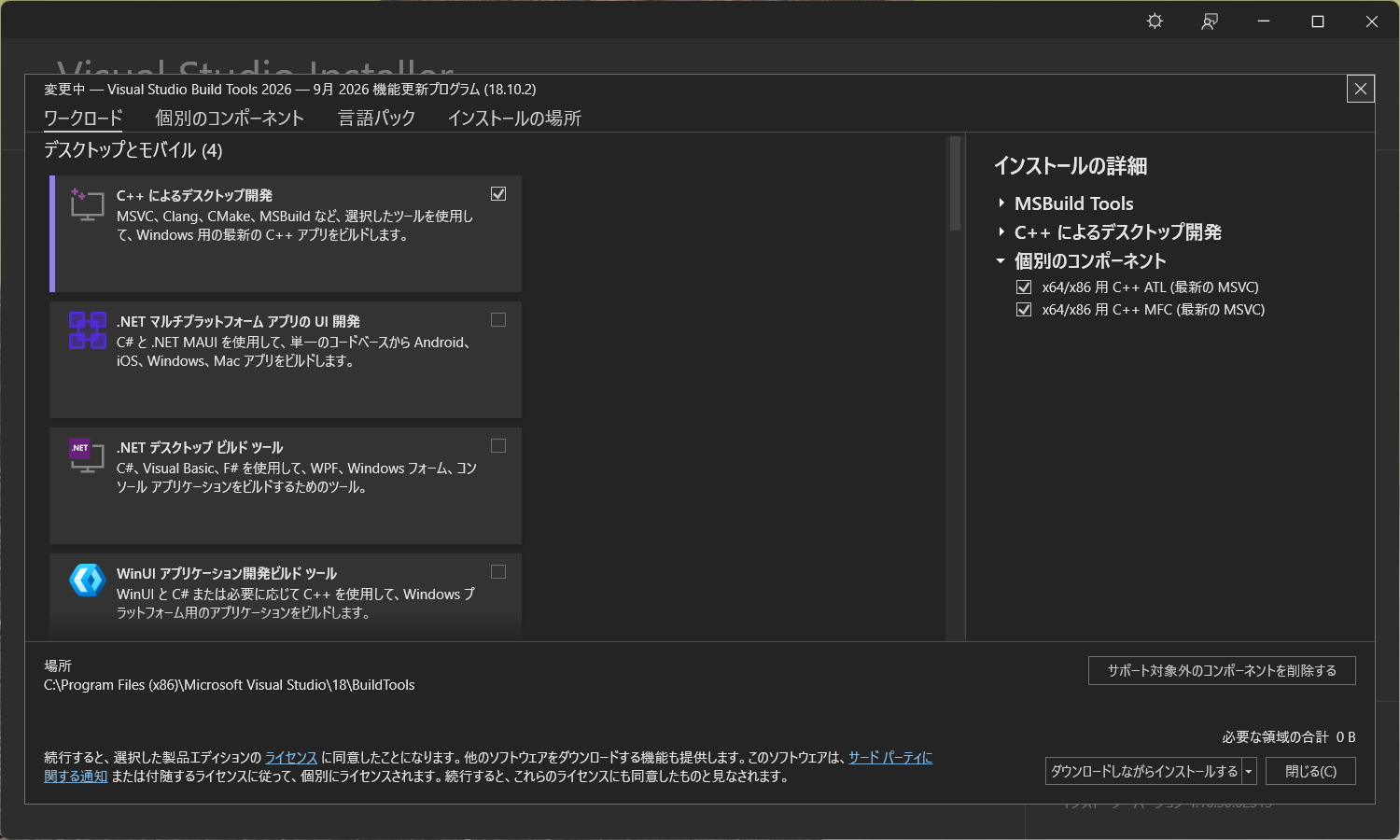
The Modify screen of Visual Studio Installer (Japanese UI). What you use to build apps is "Desktop development with C++" in the list on the left (ticked in this screenshot). "Desktop development with C++" under "Installation details" on the right is collapsed in this screenshot. Expand it and check that the Windows SDK is ticked. If you select something that was missing, let the installation run to the end. After installing, confirm that
clworks by following "Check that it works" in section 0 of the bundleddocs\building-with-blinkgtk-en.md. This screenshot was taken on a machine that already had it installed.Compiler options:
/MD /DCOMPONENT_BUILD. On Japanese Windows with MSVC, add/utf-8too (otherwise the Japanese comments in the headers cause warning C4819).The full procedure is in the bundled
docs\building-with-blinkgtk-en.md(Japanese:docs\building-with-blinkgtk-ja.md). The devel ZIP contains the source of a minimal app and a batch file that builds it, inexamples\.The GPU document and the environment-variable document are in Japanese only (there are no English versions yet).
Four things to note.
- Do not write your own forward declarations of the public
API (Windows only). The headers declare it with
__declspec(dllimport); a declaration without it in the same translation unit makes clang warn. Use only the headers. - Free return values that the caller owns with
g_free()(for exampleblink_handoff_meta_serialize()). This has been the rule since 1.2.3-build2. - To use the sandbox, link the static library
lib\blinkgtk_sandbox.liband callblink_gtk_sandbox_init()(Windows only; it cannot be called on Linux, so wrap it in#ifdef G_OS_WIN32when you share code between the two). - When the main loop returns, call
blink_gtk_shutdown()before exiting. With Windows versions up to 1.2.5-build1, leaving it out makes the process take more than 20 seconds to exit, and it ends abnormally (from 1.2.5-build2 it is done automatically, but calling it explicitly is still recommended). See "6. Shut down" at the end of the sample (blinkgtk_browser-windows.c) for where to call it.
The public API has 154 entry points. Of these 154,
the only difference from Linux is one entry point:
blink_web_view_attach_to_external_surface (Wayland only) is
not on Windows (blink_gtk_sandbox_init() above is
Windows-only and is not counted in that number).
We have called 66 of them and confirmed they work. How they are counted,
and how to list the ones not yet called, is in §0 of the bundled
docs\api-windows-notes-en.md.
Upgrading from an earlier version
The steps are the same from any version.
- Unpack the new ZIP into a separate folder and try it; if it is fine, replace the old folder.
- If you embed BlinkGTK in your own app, rebuild it
with the headers and libraries from the new devel ZIP (compatibility
with the previous
blinkgtk.dllwas not checked).
Notes for each version:
From 1.2.5-build5 to 1.2.6-build4:
- Chromium is updated from 156.0.8078.79 to 157.0.8103.38. Users of earlier Windows releases should update with the common steps above. Compare how vertical text and typesetting look on your own pages.
- The public API is unchanged (154 public API functions; the call check covered 66 of them on 2026-11-06).
- A problem where a static page kept using CPU is fixed. A process that reads the whole screen back ran every 50 milliseconds even when the page had not changed. Over a 16-second window on a static page, the browser process's CPU time fell from about 6.5-7.1 seconds to about 0.5-0.7 seconds (2026-11-06, comparing 1.2.5-build5 with the same build with the fix switched off and on, two measurements each). When the page does change, it is redrawn as before (checked with a page whose color changes after it has been static).
From 1.2.5-build3 to 1.2.5-build5 (the Windows build did not publish build4 separately, so build4's content is included here):
- Chromium is updated from 156.0.8078.73 to 156.0.8078.79, incorporating 21 security fixes. Users of earlier Windows releases should update using the common steps above. The list of fixes is on the release page.
- File System Access now stops sensitive locations.
If a location picked with
showOpenFilePicker()orshowDirectoryPicker()is insideC:\Windows, theC:\Program Filesfolders,%APPDATA%,%LOCALAPPDATA%,C:\ProgramData,.ssh,.gnupg,.configor the shell startup files in your home folder, the folder of the BlinkGTK executable or its profile, or is a UNC path that points to the local machine, it is not passed to the page and is rejected withAbortError. The home, Desktop, Documents and Downloads folders themselves are not passed either, but files and folders inside them can be picked. Checked: we opened the real picker and confirmed that protected locations are rejected and ordinary locations can be picked (Windows 11 Pro, 2026-11-02). Locations received by drag and drop have not been checked yet.
From 1.2.5-build2 to 1.2.5-build3:
- Chromium is updated from 156.0.8078.47 to 156.0.8078.73, incorporating security fixes. Users of earlier Windows releases should update using the common steps above.
- Theme following, automatic shutdown and the child-process executable from build2 are retained. For configuration, see the build1-to-build2 notes below.
From 1.2.5-build1 to 1.2.5-build2:
- Chromium stays at 156.0.8078.47. There are no changes to the typesetting and layout engine.
- The page color scheme now follows the light/dark setting of
the GTK theme (default). This covers the page's
prefers-color-scheme. Set the environment variableBLINKGTK_FOLLOW_GTK_THEME=0to go back to always-light pages. Checked, with one page that switches colors byprefers-color-scheme: withGTK_THEME=Adwaita:darkthe page is dark, withGTK_THEME=Adwaitait is light, and with0it stays light even underAdwaita:dark(Windows 11 Pro, one Intel Iris Xe machine, 2026-10-27). We did not check on Windows: the background of pages that do not specifycolor-scheme, standard parts such as scrollbars, or whether GTK follows the light/dark setting of the Windows system. - The shutdown when the main loop returns is now done
automatically. Up to 1.2.5-build1, leaving out
blink_gtk_shutdown()made the process take more than 20 seconds to exit and end abnormally. Checked: the 1.2.5-build1 sample, which does not call it, run with the 1.2.5-build2 DLLs exits in about 1 second with exit code 0 when it opensabout:blankand its window is closed (one Intel Iris Xe machine, one run). Calling it explicitly is still recommended (calling it twice is safe). To stop the automatic shutdown, setBLINKGTK_NO_AUTO_SHUTDOWN=1. - The ZIP now contains
bin\blinkgtk_subprocess.exe. It is the executable that BlinkGTK uses for child processes only when the main program does not linkblinkgtk.dlldirectly. Normal apps that linkblinkgtk.dlldirectly, such asblinkgtk_browser.exe, do not use it, and it is not meant to be run directly. - The public API did not change (still 154 entry points).
From 1.2.4-build4 to 1.2.5-build1:
- Chromium moved from 155 to 156 (156.0.8078.47). Compare how vertical text and typesetting look on your own pages.
- Hanging punctuation and one-line warichu now work.
blink_gtk_has_typesetting_feature()returns TRUE for both"hanging-punctuation:allow-end"and"warichu:single-line"(we checked that the answers match the actual behavior). If you wrote your own fallback on the assumption of FALSE, review it. - The Linux 1.2.5 changes are included, and we checked them on
Windows too (2026-10-26, once each, on the 1.2.5-build1
package):
- The
load-failederror number is passed as an integer (int). Checked: the argument is an integer, and-3is passed when a load is replaced by another page. is-loadingreturns to false when loading ends. Checked: true and false are notified around a load.set_user_agent()also applies to a page opened withload_uri()and toreload(). Checked:navigator.userAgentis the specified value after both.- The zoom level (
set_zoom_level()) is a factor (1.0 = 100%). Checked: after setting 2.0,get_zoom_level()returns 2.0 andwindow.devicePixelRatiodoubles.
- The
- Check your shutdown code (for existing apps): check
that your app calls
blink_gtk_shutdown()after the main loop (blink_gtk_run_main_loop()) returns. If it does not, with Windows versions up to 1.2.5-build1 the process takes more than 20 seconds to exit and ends abnormally. From 1.2.5-build2 it is done automatically, but calling it explicitly is still recommended. - The public API did not change (still 154 entry points).
From 1.2.4-build2 to 1.2.4-build4:
- The public API did not change (still 154 entry points; the header declarations are the same, only the comments changed).
- If you decide based on
blink_gtk_has_typesetting_feature(): the Windows 1.2.4-build2 returned TRUE for"hanging-punctuation:allow-end", which was wrong; the Windows engine does not include hanging punctuation and it does not work. This version returns FALSE for both names (allow-endandwarichu:single-line). Do not decide withCSS.supportsor computed values (they return true even where the typesetting is not included). - The screenshot API
(
blink_web_view_capture_screenshot_async()and similar): in Linux 1.2.4-build3, a screenshot on the software path changed to return the content at the time of the request. This change is included, but we have not checked it on Windows. - GPU path: it is off by default, so you need to do nothing (see The experimental GPU path).
- The bundled GTK changed:
gtk-4-1.dllis now a Vulkan-enabled build (about 1 MB larger). The default path, without the environment variable, does not change.
From 1.2.3 or earlier: use the steps above as they are. The first Windows 1.2.4 is 1.2.4-build2 (Chromium moved from 154 to 155). Up to 1.2.3-build4, a process could crash when an internal assumption failed. From 1.2.4 that check is disabled in the build.
Differences from the Linux version
| Linux | Windows | |
|---|---|---|
| Install | RPM / DEB / tarball | ZIP (MSI later) |
| GTK4 | OS package | Bundled |
| How rendered output is handed to GTK | software / EGL | software by default. There is no EGL on Windows. An experimental GPU path can be selected with an environment variable (below) |
blink_web_view_attach_to_external_surface |
Yes | No (Wayland only) |
| Hanging punctuation typesetting | Yes (from 1.2.4-build1) | Yes (from 1.2.5-build1) |
| Warichu (inline cutting notes) typesetting (one-line cases) | Yes (from 1.2.4-build3) | Yes (from 1.2.5-build1) |
| Japanese vertical text layout | Experimental adjustment off by default | Same (off by default) |
The experimental vertical-text adjustment (it aligns
vertical lines inside multi-column layouts to the column grid) is off by
default on both Linux and Windows.
To turn it on, add
--enable-blink-features=CJKVerticalColumnFragmentation
to the executable's command line (passing arguments to
blink_gtk_init() from your app does not reach it).
We have not compared the rendered output of the two operating systems
side by side, so there is no guarantee that the layout matches.
The environment variable BLINKGTK_GPU_MODE does
not change how rendering is handed over on Windows. Even with
egl, the hand-over to GTK is the same as software
(Chromium's internal rendering may differ; we have not measured the
result). To try the GPU, use BLINKGTK_WIN_GPU_PATH
below.
When you set an environment variable in cmd, put it in quotes like
set "NAME=value" (with
set NAME=value && … a trailing space becomes part
of the value).
The experimental GPU path
Only when you set the environment variable
BLINKGTK_WIN_GPU_PATH=vulkan, the result
of Chromium's GPU compositing is handed to GTK's Vulkan renderer without
being copied back into CPU memory (the usual path first copies the
screen drawn by the GPU into CPU memory). A Vulkan-capable GPU
and driver are required.
set "BLINKGTK_WIN_GPU_PATH=vulkan" && blinkgtk_browser.exe- It is experimental and confirmed on one Intel Iris Xe machine only. Other GPUs and drivers are unconfirmed. It is off by default.
- At the same frames per second, CPU use was 12–26% lower on a moving page and about 50% lower on a still page (relative to the usual path), and the GPU was used 5–14%. Each is a single 120-second measurement, taken when this path was introduced. We have not measured power (watts).
- Not checked: changes of the screen scaling (DPI), and multiple windows. Even on a still page it copies about 60 times a second (the GPU is used about 14%).
- When Vulkan is not available (with a standard GTK, and with a simulated condition that points the Vulkan driver to a file that does not exist), it did not crash and the display did not break. We have not checked a machine that really has no driver.
- Usage, what we checked and the limits are in §1 of the bundled
docs\gpu-modes-ja.md(Japanese only).
If something goes wrong
- If the window stays white or it exits at once: (1)
start
blinkgtk_browser.exe --enable-loggingand note the messages printed in the console; (2) check that the ZIP is not corrupted withSHA256SUMS; (3) check that you have not mixed in a GTK4 installed another way. If that does not fix it, report it (below) with the messages you noted. - Bundled documents: §1 to §3 of
docs\troubleshooting-en.md(Japanese:docs\troubleshooting-ja.md) have things to try, a symptom index and how to report (§4 and later are for people who build Chromium itself). For symptoms that are not there, please report them. - Documentation entry point:
docs\00-index-en.md(Japanese:docs\00-index-ja.md). Installation isdocs\INSTALLATION-en.md, Windows-specific notes on the API aredocs\api-windows-notes-en.md, and environment variables are indocs\environment-variables-ja.md(Japanese only). - Reports and questions: please use Issues of
blinkgtk-dist. Include the version (the output of
--version), the Windows build number and the steps to reproduce.
Change history
| Date | Change |
|---|---|
| 2026-10-11 | 1.2.4-build2 (Chromium 155) |
| 2026-10-18 | Updated for 1.2.4-build4: bundled Vulkan-enabled GTK, the
experimental GPU path, and the corrected answers of
blink_gtk_has_typesetting_feature |
| 2026-10-19 | Reorganized the page: separate sections for running it, checking that it works, and upgrading from an earlier version |
| 2026-10-19 | Added a "what you need depends on what you want to do" table and a pointer to installing the build environment |
| 2026-10-21 | Added screenshots of the unpacked folder, the browser window and Visual Studio Installer |
| 2026-10-21 | Fixed the run steps (double-click, Command Prompt), the download link, the Visual Studio screenshot note, added the WebKitGTK name correspondence, and reworked the upgrade steps |
| 2026-10-21 | Added the difference in load-changed values, how to
replace the path in the command, and what to check in the Visual Studio
screenshot |
| 2026-10-23 | Updated for 1.2.5-build1: Chromium 156, hanging punctuation and one-line warichu included, upgrade notes from 1.2.4-build4 added |
| 2026-10-24 | Added a note that the first start right after unpacking can be slow |
| 2026-10-25 | Added a note that unpacking onto a Dev Drive makes the first start fast |
| 2026-10-26 | Added the results of checking load-failed, is-loading,
set_user_agent and zoom_level on Windows 1.2.5-build1, and a note on
shutdown (blink_gtk_shutdown()) |
| 2026-10-27 | The automatic shutdown is now stated as available from 1.2.5-build2 |
| 2026-10-27 | Updated for 1.2.5-build2: version numbers and file names; added the "From 1.2.5-build1 to 1.2.5-build2" notes (theme following, automatic shutdown, the child-process executable) |
| 2026-10-30 | Updated for 1.2.5-build3: Chromium 156.0.8078.73 security update, upgrade steps, and license-file information |
| 2026-11-02 | Updated for 1.2.5-build5: Chromium 156.0.8078.79 security update, File System Access protection, and upgrade steps from build3 |
| 2026-11-07 | Updated for 1.2.6-build4: Chromium 157.0.8103.38, the fix for CPU use on a static page, and upgrade steps from build5 |