Building an application with BlinkGTK
A minimal guide to building an application that embeds BlinkGTK.
First: you do not build BlinkGTK itself from source
BlinkGTK embeds Chromium, so building it requires a Chromium source
tree (over 100 GB) and
anywhere from several to well over ten hours of build time. Use
the distributed packages.
This page describes how to build your application against those
packages.
The distribution is split into three packages:
| Package | Purpose |
|---|---|
| runtime | The shared library and the Chromium runtime. Needed to run |
| devel | Headers and the .pc file. Needed to
build |
| gir | GObject Introspection typelib. Needed to use BlinkGTK from Python or GJS |
1. Install
# Fedora
sudo dnf install ./blinkgtk-release-*.noarch.rpm ./blinkgtk-bin-1.2.5-build5.fc45.x86_64.rpm \
                 ./blinkgtk-bin-devel-1.2.5-build5.fc45.x86_64.rpm

# Debian / Ubuntu
sudo dpkg -i ./libblinkgtk-0.1-0_1.2.5-build5-1_amd64.deb \
             ./libblinkgtk-0.1-dev_1.2.5-build5-1_amd64.deb
If you use the tarball, extract it anywhere and tell
pkg-config where it is:
tar xzf blinkgtk-1.2.5-build5-linux-x86_64.tar.gz -C /opt/blinkgtk
export PKG_CONFIG_PATH=/opt/blinkgtk/usr/lib64/pkgconfig:$PKG_CONFIG_PATH
2. Always link through pkg-config
This is the easiest thing to get wrong, and it produces the most confusing failure.
cc -o myapp myapp.c $(pkg-config --cflags --libs blinkgtk-0.1)Do not hand-write -lblinkgtk on its own. BlinkGTK
requires Chromium's
PartitionAlloc allocator shim, and that shim must be a
direct dependency
(DT_NEEDED) of the executable so that it is loaded early.
The Libs line of
blinkgtk-0.1.pc already includes it.
If the shim is missing, the program builds, links, and starts — but
page loads never
complete (navigation does not commit, and the window stays
blank). The cause is hard to
spot from the symptom alone.
To check:
readelf -d ./myapp | grep allocator_shim
# One or more lines: good. Nothing: you are not going through pkg-config
3. Include only
blink_gtk.h
#include <blink_gtk/blink_gtk.h>
#include <gtk/gtk.h>
The public API is collected in this one header. Do not include
internal headers directly;
they change between versions.
4. A minimal application
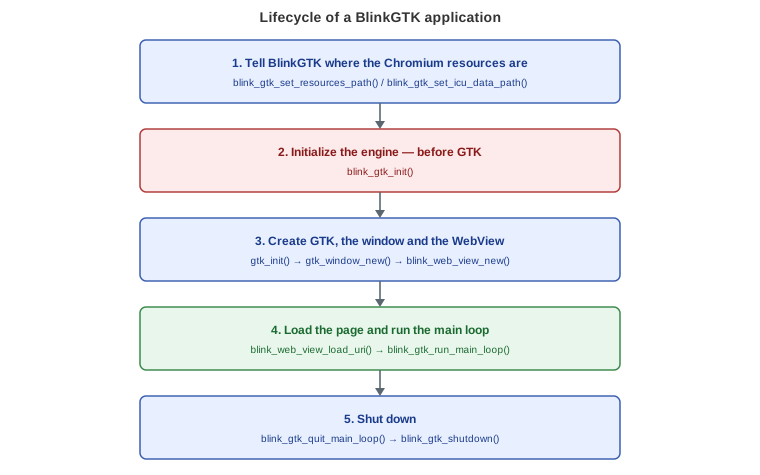
The call order matters. In particular, call
blink_gtk_init() before GTK.
Save the following code as myapp.c.
#include <blink_gtk/blink_gtk.h>
#include <gtk/gtk.h>

static void on_activate(GtkApplication *app, gpointer user_data) {
    GtkWidget *win = gtk_application_window_new(app);
    gtk_window_set_default_size(GTK_WINDOW(win), 1024, 768);

    GtkWidget *view = blink_web_view_new();
    gtk_window_set_child(GTK_WINDOW(win), view);
    gtk_widget_set_visible(win, TRUE);

    blink_web_view_load_uri(BLINK_WEB_VIEW(view), "https://example.com/");
}

int main(int argc, char **argv) {
    blink_gtk_init(&argc, &argv);
    GtkApplication *app = gtk_application_new("com.example.MyApp",
                                              G_APPLICATION_DEFAULT_FLAGS);
    g_signal_connect(app, "activate", G_CALLBACK(on_activate), NULL);
    /* BlinkGTK must run Chromium's browser main loop. g_application_run()
     * does not run it, so pages never load (the navigation does not commit).
     * blink_gtk_application_run() does the steps in the right order
     * (register, activate, then the BlinkGTK loop) and returns when the
     * last window is closed.
     */
    int status = blink_gtk_application_run(app);   /* 1.2.0-build9 and later */
    g_object_unref(app);

    blink_gtk_shutdown();
    return status;
}
Shutting down: when the main loop
(blink_gtk_application_run() or
blink_gtk_run_main_loop())
returns, always call blink_gtk_shutdown() before
main() ends. Without it, the clean-up is left
to the very end of the process (atexit). On Windows it cannot finish
cleanly there, and the process
may take a long time to exit and then end abnormally. Use the same code
on Linux too.
Note: blink_web_view_new() returns a
GtkWidget *, but the BlinkGTK API takes a
BlinkWebView *. Cast with
BLINK_WEB_VIEW().
5. Example Makefile
Save this as Makefile next to myapp.c. The
last line starts with a tab, not spaces.
CC      ?= cc
PKGS     = blinkgtk-0.1
CFLAGS  += -O2 -Wall $(shell pkg-config --cflags $(PKGS))
LDLIBS  += $(shell pkg-config --libs $(PKGS))

myapp: myapp.c
	$(CC) $(CFLAGS) -o $@ $< $(LDLIBS)
Build and run it.
make
./myapp
6. What is needed at run time
Wayland is required
BlinkGTK is Wayland only; it does not run on X11.
Run it in a Wayland session, or use
Weston's headless backend for automated verification:
weston --backend=headless-backend.so --width=1024 --height=768 &
export WAYLAND_DISPLAY=wayland-1
Where Chromium's resource files must be
Chromium needs its ICU data (icudtl.dat), V8 snapshots
(snapshot_blob.bin and
v8_context_snapshot.bin), and resource packs
(content_shell.pak). The current working
directory is not used. They are looked up in this order:
- The directory set with
blink_gtk_set_resources_path()(if you set one, only this is used) - The directory containing the executable
- If
icudtl.datis not there, relative to wherelibblinkgtkis installed (<libdir>):
<libdir>/blinkgtk-0.1/chromium/,<libdir>/chromium/, then<libdir>/(1.2.3 and later)
With an RPM or DEB installation, or the tarball extracted to
/, the files are found in
step 3, so there is normally nothing to do. If you put the resources
somewhere else, startup
fails with:
ERROR:base/i18n/icu_util.cc: Invalid file descriptor to ICU data received.
FATAL:base/i18n/icu_util.cc: Check failed: result.
In that case, set the resource directory with
blink_gtk_set_resources_path() before
blink_gtk_init():
blink_gtk_set_resources_path("/opt/myapp/lib/chromium/"); /* before blink_gtk_init() */If you also extracted the libraries elsewhere (for example
/opt/blinkgtk), set the library
search path to match:
export LD_LIBRARY_PATH=/opt/blinkgtk/usr/lib64/blinkgtk-0.1:\
/opt/blinkgtk/usr/lib64/blinkgtk-0.1/chromium
7. What to check first when something goes wrong
| Symptom | Check this first |
|---|---|
Link errors (undefined reference) |
Does pkg-config --libs blinkgtk-0.1 print anything? Is
the devel package installed? |
| Starts, but the page stays blank | readelf -d ./myapp | grep allocator_shim — is the shim
a direct dependency? (section 2) |
Invalid file descriptor to ICU data |
Where the executable sits relative to the resources (section 6) |
| No window appears | Are you in a Wayland session?
echo $WAYLAND_DISPLAY |
| Python cannot import it | Is the gir package installed? |
8. About using GTK4 itself
BlinkGTK is a library that provides one GTK4 widget.
How to use GTK4 itself — windows,
layout, buttons, menus, event handling — is covered by the GTK4
documentation, not here.
- GTK4 API reference: https://docs.gtk.org/gtk4/
- Getting started with GTK4: https://docs.gtk.org/gtk4/getting_started.html
- GObject basics: https://docs.gtk.org/gobject/
- GLib (main loop, signals, and so on): https://docs.gtk.org/glib/
- Migrating from GTK3: https://docs.gtk.org/gtk4/migrating-3to4.html
BlinkWebView derives from GtkWidget, so it
behaves like any other GTK4 widget: put it in a
container, set size requests, connect signals.
The main loop is the one exception. Use
blink_gtk_run_main_loop() rather than GTK's
g_application_run() or g_main_loop_run() (see
section 4).
Using it from Python, Rust, and other languages
BlinkGTK supports GObject Introspection, so it can be used from
PyGObject and gtk-rs. Refer to the
documentation of each binding for how to use them.
- PyGObject: https://pygobject.gnome.org/
- gtk-rs (Rust): https://gtk-rs.org/
Related
- Detailed installation steps:
INSTALL.md - Design guidance for embedding: the consumer integration guide
- Working samples bundled with the distribution:
examples/